Building cost-effective AI solutions with Azure AI Foundry services and LLMs
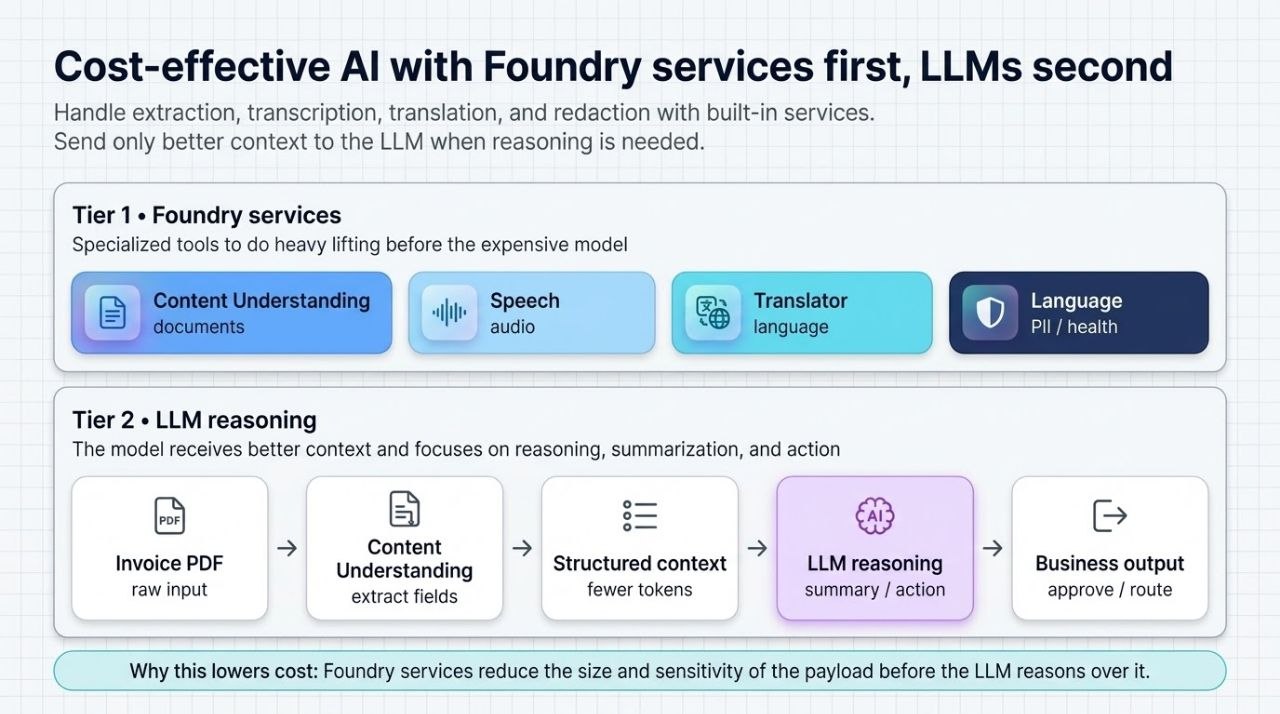
Many AI projects start the same way: a team opens Azure AI Foundry, connects an LLM, and begins building.
That is a valid way to prototype. It is not always the most cost-effective way to build a production solution.
In many real-world use cases, the expensive part is not reasoning. It is extraction, transcription, translation, redaction, or classification. Those are exactly the kinds of jobs that Azure AI Foundry already supports through purpose-built services.
The practical pattern is simple:
Use Foundry services for the specialist work, and use the LLM only for the part that truly needs reasoning.
That approach reduces token spend, improves consistency, and keeps the solution easier to operate.
Why this matters for product owners and developers
If you are a product owner, the business question is usually:
- how do we deliver the feature with the right cost profile?
- how do we avoid paying LLM tokens for work that does not need them?
- how do we make the solution reliable enough for production?
If you are a developer, the technical question is usually:
- which component should do OCR, translation, or transcription?
- what should be sent to the LLM?
- how do we keep the prompt small and the output predictable?
The answer is usually the same:
- let a specialist Foundry service do the domain-specific preprocessing
- pass the reduced output into the LLM
- use the LLM only for reasoning, summarization, or next-step generation
The Foundry services that help reduce cost
Azure AI Foundry gives you services that can handle common pre-LLM tasks.
Content Understanding
Use this for documents, invoices, forms, contracts, and similar content where you need fields or structured extraction.
Microsoft documents Content Understanding for scenarios such as:
- intelligent document processing
- invoice processing
- contract analysis
- claims management
- tax preparation
Speech
Use this for:
- speech-to-text
- text-to-speech
- speech translation
- batch or real-time transcription
This is useful when your input is audio and your real task is not “understand audio” but “turn speech into a usable text workflow”.
Translator
Use this for text and document translation, especially when you need:
- preserved document layout
- glossary-driven terminology
- multilingual input handling
- translated output before downstream reasoning
Language
Use this for:
- PII detection and redaction
- conversational PII redaction
- health text analysis
This is especially valuable when you want to remove sensitive data before the LLM sees the content.
The cost-effective architecture pattern
A good hybrid flow looks like this:
Input → Foundry specialist service → structured / redacted output → LLM reasoning → business action
That means the LLM receives a smaller and cleaner payload.
Instead of asking the model to:
- read a full invoice PDF
- perform OCR
- extract fields
- validate totals
- explain the result
you let the specialist service handle extraction and send only the useful summary to the model.
That is where the cost savings come from.
A concrete use case: invoice review
Let’s say your finance team receives vendor invoices in PDF format. The system needs to:
- extract invoice fields
- validate totals and tax
- flag exceptions
- generate a summary for review
Step 1: Use Content Understanding
Content Understanding extracts the structured fields from the invoice. For example:
- invoice number
- vendor name
- total amount
- tax
- due date
- confidence score
- exception flags
Step 2: Apply business rules
Your application can then check:
- is the invoice above the auto-approval threshold?
- is the purchase order missing?
- does the tax rate look unusual?
- are there mismatches in the totals?
Step 3: Call the LLM only for reasoning
Now the LLM gets the structured result, not the full raw document.
Example input to the LLM:
{
  "invoice_number": "INV-20491",
  "vendor": "Contoso Supplies",
  "invoice_total": 18450.0,
  "currency": "EUR",
  "confidence": 0.96,
  "flags": ["missing_purchase_order", "above_auto_approval_limit"]
}
Expected LLM output
The model can now produce a useful business answer:
Invoice INV-20491 from Contoso Supplies was extracted with high confidence, but it exceeds the auto-approval limit and is missing a purchase order reference. Recommend manual review by finance operations before payment.
Why this is better
This is cost-effective because:
- the LLM does not spend tokens on OCR-like work
- the prompt is much smaller
- the output is more consistent
- the workflow is easier to govern
- the business team gets a clearer answer faster
Another good example: call center summarization
A call center workflow often starts with audio, not text.
A cost-effective flow is:
audio recording → Speech transcription → PII redaction → LLM summary
That means:
- Speech handles transcription
- Language handles sensitive data removal
- the LLM summarizes the call, identifies intent, and proposes next steps
That is far more efficient than sending raw audio and sensitive data into a general-purpose model.
What to route where
A simple decision rule works well in production:
- Documents and forms → Content Understanding
- Audio → Speech
- Translation → Translator
- Sensitive text → Language PII redaction
- Clinical text → Text Analytics for Health
- Reasoning and explanation → LLM
This is not about avoiding LLMs. It is about using them where they add the most value.
What teams should optimize for
The right success metric is not “how many LLM calls did we make?” The better metric is:
How much did it cost to complete the business task end to end?
That usually includes:
- token spend
- latency
- manual review cost
- privacy risk
- support overhead
- developer complexity
A hybrid Foundry + LLM design usually improves all of those.
Microsoft Learn references
- Azure Content Understanding overview
- Azure Speech overview
- Speech to Text overview
- Speech translation overview
- PII detection in Azure AI Language
- Text Analytics for health
- Azure Translator document translation
- Azure Translator text translation
Closing thought
The most cost-effective AI systems are not the ones that use the largest model everywhere. They are the ones that use the right capability in the right layer.
Azure AI Foundry gives you that separation:
- Foundry services for the specialist tasks
- an LLM for the reasoning tasks
- governance for cost, privacy, and routing
That is the pattern I would recommend for product teams that want to build practical AI, not just impressive demos.